Start up Outlook Express by clicking on the icon (See "Image #1").
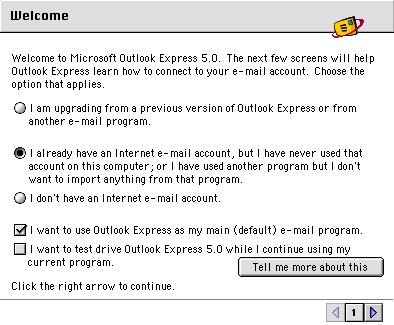
Select I already have an Internet e-mail account, but I have never used that account on this computer; or I have used another program but I don't want to import anything from that program. (See "Image #2")
Click the Right Arrow button.
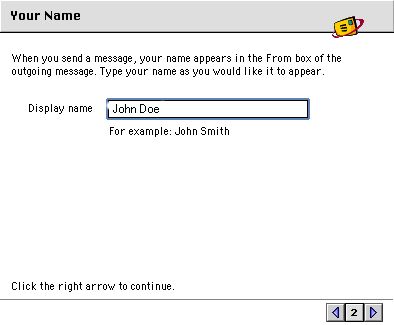
In the Display Name field, type your name, (e.g. John Doe).(See "Image #3")
Click the Right Arrow button.
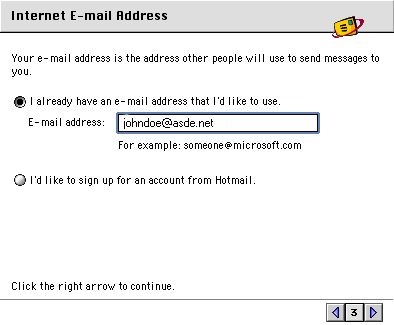
In the E-mail address field, type your full ASDE email address (e.g., johndoe@asde.net). (Remember to use the extension ".net" instead of ".com")(See "Image #4")
Click the Right Arrow button.
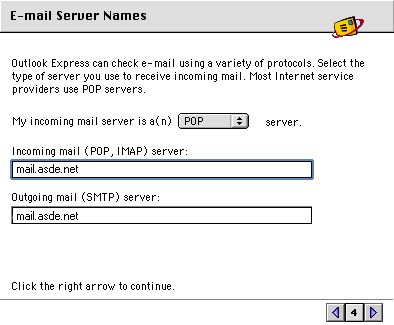
Click the arrow box on the My incoming mail server is a(n) pop-up list and choose POP. (See "Image #5")
In the Incoming mail (POP, IMAP) server and Outgoing mail (SMTP) server fields, type mail.asde.net (See "Image #5") (Remember to use the extension ".net" instead of ".com")
Click the Right Arrow button.
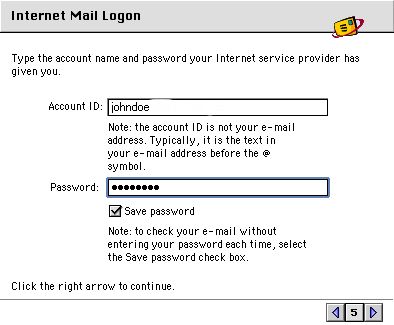
At the Internet Mail Logon window, type in your Account Name and Password (optional). (See "Image #6")
Click the Right Arrow button.
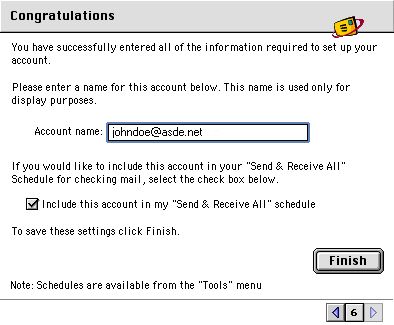
In the Account name field, type your full ASDE email address (e.g., johndoe@asde.net). (See "Image #7")
Click the Finish button.