HOW TO DETERMINE IF E-MAIL IS BEING DOWNLOADED TO YOUR COMPUTER ON A DIAL-UP CONNECTION
This page is best viewed at 800x600 resolution!
This will instruct you on how to determine if you are downloading e-mail to your computer from ASDE's mail server. These instructions are if you have a dial-up connection only.
If someone has sent you an e-mail with a large attachment, it may appear that you are not receiving any e-mail.
By following these instructions, you can determine if you are actually downloading the e-mail(s).
NOTE: Depending on your connection speed, you can download 10 to 12 megabyte of data per hour.
While you are receiving e-mail, right-click on the modem connection icon located on the taskbar on the lower right of you monitor. (See "Image #1")
Left-click on Status on the menu that appears. (See "Image #2")
Once the "Status" window is open, you will see "Bytes Received" displayed. (See "Image #3")
Watch to see if the number next to "Bytes Received" is increasing. If that number is increasing, that indicates that you are downloading data (i.e., e-mail). Note that your modem connection speed is also displayed in the "Status" window.
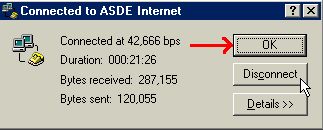
To close the status window, click on "OK" (See "Image #4")
|
IMAGE #1 (Below)
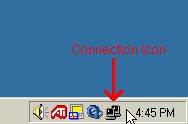
IMAGE #2 (Below)
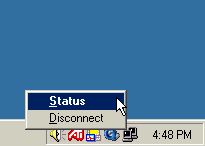
IMAGE #3 (Below)
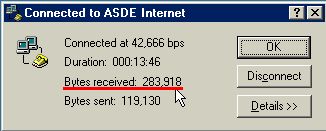
IMAGE #4 (Below)
|
|
|