1. Double-Click on My Computer.
2. Double-Click on Dial-up Networking folder.
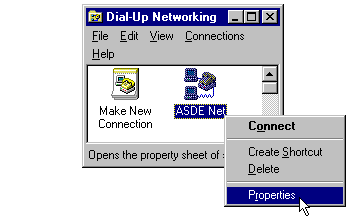
3. RIGHT-Click (use the right mouse button, not the left) on the ASDE Net icon. (The icon for the dialer you use may be named something other than "ASDE Net". Make sure you make changes to the correct one.)
4. A file menu will appear. Click on Properties. (See "Image #1" to the right.)
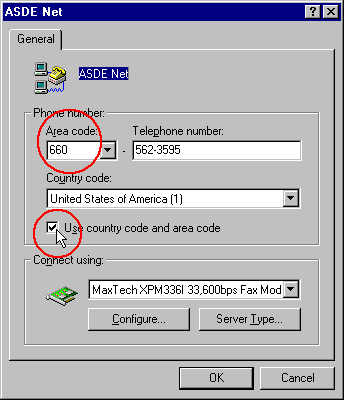
5. That will bring up the "ASDE Internet" window. (See "Image #2" at right.) If you are in the correct dialer, the displayed phone number will be 562-3595.
6. There needs to be a check mark in the Use Country Code and Area Code box. If there isn't, click in the box so that one is placed in it. (See image at right.)
7. Look in the Area Code box towards the top of the window. It should have the numbers 660 displayed in the box. If it doesn't, click in the box and type them in. (See "Image #2" at right.)
8. Click OK at the bottom of the window.
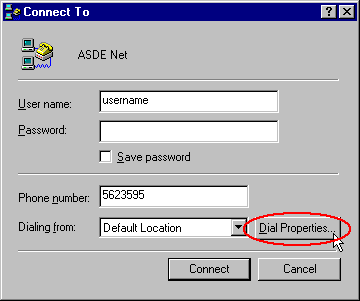
9. Now double-click on the ASDE Net icon. (Or the icon you accessed in step #3 above.)
10. Click on the Dial Properties button. (See "Image #3" at right.)
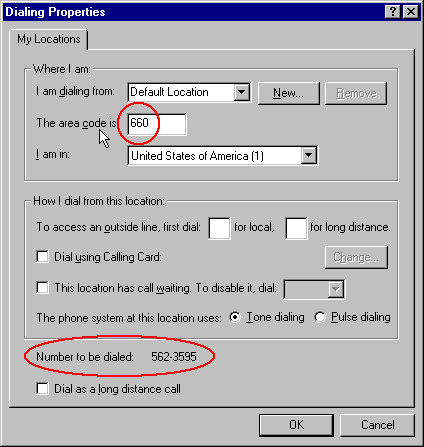
11. In the Area Code box, you need to have 660. (See "Image #4" at right.)
12. Towards the bottom of the window, the "Number to be dialed" will be displayed. It should read "562-3595" with nothing in front of it (unless you have call waiting disabled.) (See "Image #4" at right.) (If you have call waiting disabled, "*70," will be displayed in front of the phone number.)
13. Click on OK at the bottom of the window.
You should now be set up to dial ASDE Internet as a local number! If you are still having problems, please call us for assistance.