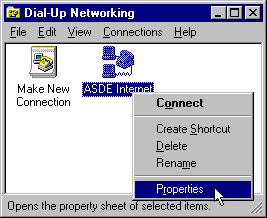
1. Double-Click on My Computer.
2. Double-Click on Dial-up Networking folder.
3. RIGHT-Click (use the right mouse button, not the left) on the ASDE Internet icon.
4. A file menu will appear. Click on Properties. (See image to the right.)
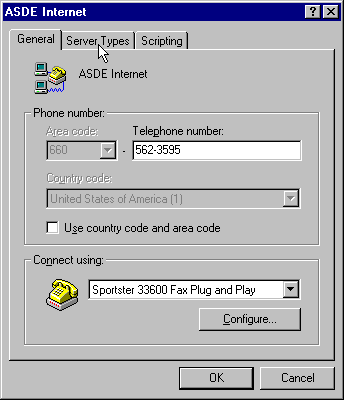
5. That will bring up the "ASDE Internet" window. (See image at right.) Now, type 562-3595 in the Telephone number box.
6. Click in the "Use country code and area code" box to remove the checkmark. (You do not want a checkmark in that box unless you will be calling long distance.)
7. Click on Server Types tab at the top of the window. (Or the "Server Types" button near the bottom of the window.)
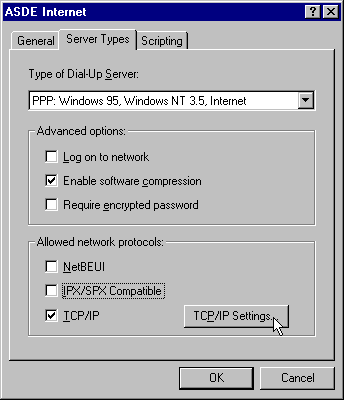
8. Your settings should look like the ones in the image to the right. (The Type of Dial-Up Server may say Windows 98 instead of Windows 95. That is fine.)
9. Under Advance Options:
10. Under Allowed Network Protocols:
11. Click on TCP/IP Settings button.
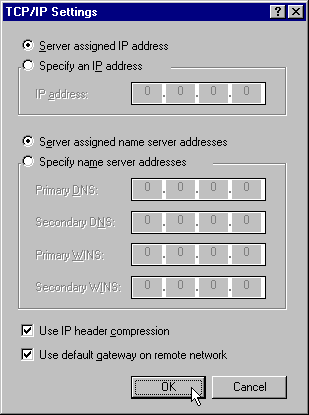
12. Click in the circle next to the sentence Server assigned IP address to place a black dot in it.
13. Click in the circle next to the sentence Server assigned name server addresses to place a black dot in it.
14. Click in the box next to the left of the sentence Use IP header compression to place a check mark in it.
15. Click in the box next to the left of the sentence Use default gateway on remote network to place a check mark in it.
16. Click OK. Continue to click OK until you are back to the Dial-Up Networking window.